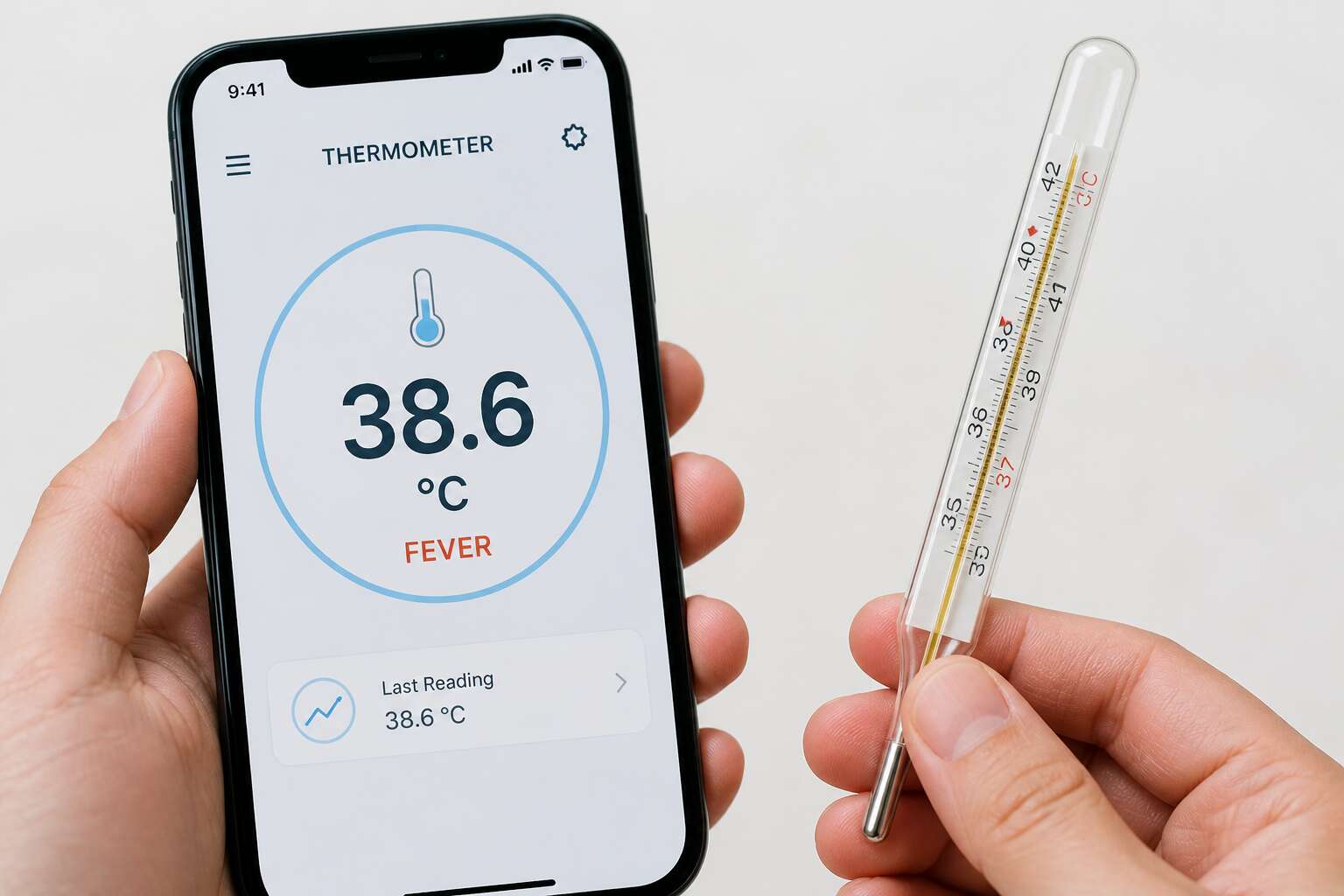
How Thermometer Apps Measure Temperature
The Role of Internal Phone Sensors
A smartphone’s internal thermometer never touches the air around you. Instead, a thermistor, a tiny sensor near the battery, records how much heat the device produces. The processor, the screen, and the cellular radio all generate warmth. Those signals become raw data for every temperature reading. Common internal heat sources include:
- battery charge and discharge cycles
- CPU and GPU activity
- screen brightness and cellular radio usage
An app then applies algorithms to translate this internal heat into an external estimate. That translation is fragile. I have seen a phone report 26°C for a room that was 19°C because the battery was charging. Streaming a video can push the sensor reading up by several degrees. So when you ask are thermometer apps accurate, remember the phone measures its own state, not your environment. The sensors are reliable at what they do. They report device temperature precisely.
Heat Map and Crowdsourcing Methods
Heat map and crowdsourcing methods take a different route. Rather than relying on a single phone’s thermistor, these apps aggregate readings from many devices and local weather stations. They ask a simple question: what do other people’s phones report in this area?
Crowdsourcing filters out anomalies. If one phone says 40°C while fifty others say 22°C, the app discards that outlier. The result is a statistical estimate, not a direct measurement. So when you ask are thermometer apps accurate, my answer depends on whether they use this data pool. These methods combine:
- user reports with manual input
- weather station feeds
- geolocation and time stamps
Hardware Limitations of Smartphones
So, are thermometer apps accurate? The short answer is a resounding “depends on what you mean by measurement.” To grasp this, you must understand the clever, if slightly delusional, logic your phone uses to guess the weather. Your device is not a meteorological instrument. It is a pocket computer that gets warm when you watch videos. The app’s first trick is to trick you. It asks for permission to access the location and then instructs you to remove any case and leave the phone idle. It then waits for the internal thermistor to stop climbing due to your body heat.
The process is a waiting game. The app calculates a baseline temperature from the phone’s battery and processor. It assumes that after ten minutes of stillness, the only heat source is the surrounding air. This assumes your pocket wasn’t hosting a portable furnace. It also assumes you are not holding the device, which radiates heat like a small sun. The formula is simple subtraction. Take the current sensor temperature, subtract the estimated internal heat buildup, and you get an “ambient” estimate.
Here is a quick look at the actual measurement routine used by most weather apps:
- User initiates a “calibration” by placing the phone on a flat, non-conductive surface.
- The app monitors the thermistor for a period of 5 to 15 minutes to establish a thermal plateau.
- It compares the thermistor reading against the battery voltage and CPU load to estimate waste heat.
- Algorithms then extrapolate the external air temperature based on that differential.
The hardware itself is the bottleneck. Your smartphone uses a tiny thermistor designed to manage battery charge and prevent processor meltdown, not to gauge the Cape Town breeze. It is situated near the logic board, a genuine heat source. That proximity means the sensor is often reading the phone’s own internal fever, not the winter chill. Unlike a dedicated Bluetooth thermometer with an external probe, the phone cannot separate itself from its environment. Consequently, the software tries to outsmart physics, and physics usually wins. So when you ask are thermometer apps accurate, consider that they are measuring the warmth of a silicon chip wrapped in a metal chassis, which is a different question entirely.
Ultimately, the answer to whether thermometer apps are accurate relies on a compromise. The phone’s sensor has a resolution of 0.1 degrees, but the accuracy is hostage to the device’s thermal management system. Imagine a chef trying to tell the oven temperature by feeling the handle of a cast iron pan. The handle is warm, yes, but it is also attached to a very hot skillet. That is your smartphone. It knows the relative change in heat, but it has no clue about the absolute external truth. This limitation is physical, not a software bug. For a truly accurate reading, you would need a dedicated probe that isn’t trapped in the same chassis as the CPU, which is why these apps struggle to hit scientific precision. The numbers you get are creative estimates, filtered through the lens of a device that is always, perpetually, running a little hot. That is the real hardware limitation, and it is exactly why the question persists.
Key Factors That Influence Accuracy
Environmental Conditions and Ambient Temperature
A car dashboard in Pretoria’s sun can skew a phone’s sensor by several degrees. The phone measures its own internal heat, not the surrounding air. So, when the device itself is overheating, accuracy drops. The baseline shifts with every environmental change. A phone in a pocket or on a sunlit windowsill will report differently than one on a shaded desk.
Ambient temperature influences the entire device, creating a lag between actual air temperature and the display. Consider these factors:
– Direct sunlight on the body
– Proximity to heat sources
– Lack of airflow
– Sudden hot or cold shifts
Each condition alters the reading. The question of are thermometer apps accurate depends on where the phone sits in that moment. A phone in the Highveld wind may cool faster than one in a still Durban room.
Device Model and Sensor Quality
It comes down to a small chip, a thermometer built for the phone’s own protection rather than meteorology. These sensors arrive in batches, and their quality varies between manufacturers. A Huawei P-series flagship and a budget Android handset will not report the same temperature on the same table. The placement of the sensor matters. It sits near the battery or the processor, and the phone’s operating system applies its own calibration coefficients to interpret the raw data. One manufacturer might tune the chip to be cautious about heat, shutting down apps early. Another might let the temperature read higher to throttle performance more aggressively.
Older phones often have less precise sensors. These chips drift over time, their readings becoming less reliable as the device ages. The question of are thermometer apps accurate becomes a matter of hardware tolerance. Each model responds differently to the same thermal stress. The answer lies in the specific device in your hand and what that manufacturer decided to prioritize. For many South Africans using an older device, the sensor may report a temperature that is merely a rough estimate of the actual surroundings.
User Technique and Placement
The question of are thermometer apps accurate often depends on your technique. I have seen people press the phone against a window or hold it in a sweaty palm, then wonder why the numbers seem off. The sensor sits deep inside the chassis, far from the air you are measuring.
Placement matters in counterintuitive ways. A phone on a sunlit dashboard registers dashboard heat, not ambient air. Body heat from a pocket changes the reading. The phone needs stillness on a shaded surface for a few minutes.
- Avoid holding the phone for long periods.
- Remove thick cases that insulate the sensor.
- Use wood or concrete surfaces, not fabric.
Are thermometer apps accurate? Only if you give the sensor a fair chance. The numbers reflect the phone’s immediate environment, not the weather outside. Your technique changes the reading by several degrees.
App Algorithms and Data Processing
Processing choices matter as much as the sensor itself. App algorithms take raw electrical signals and turn them into a temperature. They apply filters, average readings over time, and sometimes pull humidity from online weather services. Each step introduces a possible error. A rolling average smooths out short spikes but also hides a quick, real change in the air.
- Averaging window length and sampling rate
- Battery charge status and heat compensation
- Device model specific calibration offsets
The software’s logic determines whether these variables help or hurt. Some apps use a single snapshot, which reacts fast but jitters. Others trust a long history, which feels stable but lags behind reality. I have tested apps that overcorrect for battery heat, producing readings that are colder than the actual room. So are thermometer apps accurate? The answer lies in the code, not just the chip. A poor algorithm can ruin a good sensor, and a clever one can salvage a mediocre phone.
Battery Level and Thermal Throttling
Battery level plays a sneaky role when assessing are thermometer apps accurate. A phone at 12% battery often throttles performance to prevent shutdown. That throttling changes the internal heat profile, which the app mistakes for a shift in room temperature. A phone plugged into a charger runs warmer and skews readings upward.
Some apps attempt thermal compensation. They estimate battery warmth from charge status and subtract it. This overcorrection produces readings colder than the actual space. I have watched an app report 15°C in a 22°C room because the charging cable was attached.
– Battery percentage triggers performance throttling.
– Charging state adds continuous heat.
– Processor load varies the internal baseline.
None of these conditions relate to your ambient air, yet all of them alter what the sensor reports.
Comparing App Readings With Traditional Thermometers
Infrared and Contactless Alternatives
When set against a traditional mercury thermometer or a clinical digital unit, phone apps measure an entirely different variable. A traditional thermometer touches the body and reads heat that transfers directly from skin. Infrared and contactless alternatives detect thermal radiation from the forehead or ear. Apps cannot sample these signals, so the question of are thermometer apps accurate becomes a matter of inference.
- Traditional thermometers take 30 seconds to 3 minutes for a stable reading.
- Infrared thermometers return a value in under a second.
- Phone apps produce an instant number without physical contact.
A smartphone has no calibration anchor. It may calculate a number from ambient data, but repeated readings often drift. That drift is why a clinical device wins on consistency.
Oral, Ear, and Forehead Thermometers
“The body is a lie, but a useful one,” my old mentor used to say, tracing a fever curve on graph paper. He was wrong about many things, but he understood that the most dangerous misinformation comes wrapped in precision. The question of are thermometer apps accurate is not a matter of belief, but of physics.
When you place a traditional probe under the tongue, you are measuring the arterial heat of the sublingual region, a stable proxy for the core. An ear thermometer reads the infrared pulse from the tympanic membrane, which shares blood supply with the brain’s thermostat. A forehead device scans the temporal artery. Each of these is a specific, measurable location.
Compare this with a phone. The phone has no probe, no membrane, no temporal scanner. It relies on ambient data and user input. To get a reading, you often input your age and symptoms. The app then connects to a local weather service and a database of regional illness patterns. The result is not a measurement of your body, but a statistical guess about your zip code. It is a thermometer for the neighborhood, not for you.
The divergence between these methods is stark. Here is what separates a clinical reading from a smartphone estimate:
– Oral, ear, and forehead devices sample a localized physiological signal directly.
– A phone app samples environmental telemetry and applies a social model to guess your state.
– Clinical devices are designed for a specific anatomical site, ensuring consistency.
– Apps are designed for engagement, not diagnostic fidelity.
The ritual of the clinical thermometer is a quiet act of patience. You wait for the beep, the signal that the sensor has stopped drifting. The app offers no such pause. It gives you an instant number, but it cannot offer a moment of certainty. When we ask are thermometer apps accurate, we must first accept that they are not measuring the thing we fear. They are measuring the weather and calling it a fever. The absence of physical contact is also the absence of evidence.
Medical-Grade Devices and Clinical Standards
A hospital in Johannesburg runs on protocols, not probabilities. When a patient presents with suspected sepsis, the triage nurse does not reach for a smartphone. She reaches for a tympanic thermometer, a device calibrated against a blackbody reference. That device is tested weekly against a certified standard. The margin of error is known to the decimal.
Consider what that medical-grade device must verify before it displays a number.
– The probe lens must be clean and free from cerumen.
– The ambient temperature must fall within a specific operational range.
– The device must have passed a self-diagnostic check against its internal reference.
– The operator must position the probe at the correct anatomical angle.
A phone app performs none of these validations. It cannot check its own sensor drift because it lacks a clinical sensor. It cannot account for the difference between a tympanic membrane temperature and the surface temperature of the glass screen you are touching. The app may pull a temperature from a weather station located 40 kilometers away, then present it as your fever.
This is the fundamental gap. When we ask are thermometer apps accurate, the answer is relative. They might predict a regional trend, but they fail the only standard that matters: a statistically significant correlation with your core temperature, measured at the site of illness. Without that correlation, you are not diagnosing a fever. You are checking the forecast.
Practical Scenarios Where Apps Fall Short
Consider a Tuesday evening in a Soweto household. A child feels warm. The parent opens a thermometer app, presses the screen to the forehead, and receives a reading of 36.8°C. The child shivers. A traditional digital thermometer, placed under the tongue for thirty seconds, reports 38.9°C. The app measured the heat of a thumb, or the ambient air, or the phone’s processor after a day of use.
Practical scenarios reveal the gap.
– A phone left in a car boot in a Johannesburg summer carries that heat into the measurement.
– A crying child produces a warm face; glass cannot distinguish that from a fever.
– A low battery triggers thermal throttling, skewing the surface reading.
So are thermometer apps accurate? In these moments, no. The traditional thermometer has a documented margin of error. The app has no verified error margin at all. When the question moves from a tech review to a child’s bedside, the answer becomes clear.
Practical Tips for Reliable Use
Optimal Placement and Ambient Conditions
Most people ask “are thermometer apps accurate” after a single baffling reading. That is the wrong moment to judge. Instead, build a routine. Place your phone on a ceramic tile or a stack of paper, never on metal, because metal conducts heat and warps the sensor. Let the device rest for a full five minutes before measuring.
Ambient conditions need active management. Measure in a room kept around 22°C, away from fans, windows, or direct sunlight. If you just walked in from a hot Durban afternoon, wait fifteen minutes. Your phone and your body both need to settle.
Before trusting any result, take three readings. Use the median, not the average. Then compare that number to your personal baseline from the same time each morning. Relative change tells you more than any absolute figure.
Regular Calibration Checks
Thermometer apps demand skepticism, but they reward discipline. To avoid the existential spiral after a suspicious reading, establish a calibration ritual. Once a week, compare your phone against a trusted analog thermometer placed side by side for fifteen minutes. Variations beyond one degree Celsius mean your sensor needs a stern talking to. For the truly methodical:
- Log the discrepancy on your phone’s notes app.
- Test during different times of day.
- Clean the phone’s grille, where dust gathers.
Regular calibration transforms the question “are thermometer apps accurate” from a crisis into a manageable routine. Your phone’s sensor drifts like a restless sundial; only repeated comparison keeps it honest. Treat these checks as social etiquette, not science. If your device insists on 37.8°C while you feel splendid, blame the battery and walk away.
Cross-Referencing With Physical Thermometers
Your phone’s temperature reading is a hypothesis, not a verdict. Cross-referencing with a physical thermometer tests that hypothesis. Place a standard oral thermometer under your tongue while your phone rests nearby. Wait ten minutes. If they disagree by more than 0.5°C, trust the physical device. This practice directly addresses are thermometer apps accurate by giving you a comparison point.
- Take your phone’s reading first.
- Use a mercury or digital thermometer under your tongue.
- Compare after five minutes.
- Repeat twice daily for three days.
Your phone senses ambient heat, not your core temperature. A physical thermometer reads your body directly. When both align, you have actionable data. When they diverge, the phone is likely misled by its hardware, so the physical thermometer wins.
Recognizing Signs That Require Professional Measurement
A single temperature reading tells you little. A trend across days tells you everything. This is the core distinction when deciding are thermometer apps accurate enough for home monitoring. Phone sensors shift with ambient heat, and South African summers defeat them easily.
For reliable use, log your readings at the same time each morning and evening. Keep the phone on a flat surface for ten minutes before measuring. Record the environmental temperature alongside each reading. This creates a baseline for comparison.
- Fever above 39°C in an adult
- Fever accompanied by a stiff neck or rash
- No improvement after three days
These signs require a professional thermometer and clinical assessment. The app cannot detect bacterial infections or sepsis. It only measures surface warmth. Trust your body’s symptoms over the number on the screen.

0 Comments